MODS 2017 vignettes – Day 2

Alright, here I am, attending MODS 2017 day 02. Checkout my post on MODS day 01 experience here (for those who don’t know about MODS check it out here). Yesterday was a blast, MODS 2017 day 1 was so overwhelming it scared me a little bit. I learned more than I thought I would, I got to know about a lot of new tech and trends. My expectations today are off the charts. Can’t wait to attend the sessions. Like yesterday, I am gonna do a live blogging about my experience. Here it goes, first session is on AI.

Data is the new oil, but that oil is AI. Mr. Ajit Jaokar needs no introduction. (for sake of completeness here is a brief intro) Ajit is well-known personality in the field of AI and machine learning, teaches data science for IoT at Oxford and more. Ajit explains about AI and future of AI, progress is inevitable, machines will lie and cheat in the future if needed. A very good intro of deep learning, Top-down and bottom down approach and related challenges. Bottom up approach has no rules. In 4 -5 years market will be more vibrant and organised, this is the best time to learn AI and Machine learning. One of the most curious questions “Types of problems that AI can address”, few examples are: Complex planner: tasks which require planning, better communicator (chat bots, remember that racist Microsoft bot), new perception, Enterprise AI, ERP and data warehousing, super long sequence pattern recognition etc. AI can be anywhere, I mean can you think of using AI for cucumber farming ??? to sort good and bad cucumbers, applications and area are limitless, not even sky is the limit (probably not even milky way galaxy is the limit with AI). Data is the new oil indeed, no data, no training. AI will impact almost everything soon. Machines training machines is happening as we speak. Great insights on AI and deep learning. Thank you Mr. Jaokar. Cannot think of any better way to start #mods17 day 02.

Short session (15 minutes) on Karnataka start-up policy. Mr. Aniket Vaidya is the speaker. Karnataka’s vision is to create the best ecosystem for startups in the capital. There are 4000+ startups in Bengaluru itself. Govt is taking several steps in making business for startup easier. Aniket makes audience aware of the benefits and conditions provided by Karnataka govt for tech startups. Get funded by the Karnatka govt. Neat initiative and a great push towards make in India.

Next up is Building a BFF (Backend for Frontend) with swift on server by Mr. Pushkar Kulkarni. If you have followed my blog for #mods17, you know I love swift. No surprises that this session sounds very lucrative to me. A general purpose API (monolith or microservice) may not be apt for mobile clients. The thought provoking question here is “Is one backend for several clients right and peaceful?”. The solution is one backend per experience. Speaker clearly communicated swift history and evolution. Swift is already available on Darwin platforms, a great many frameworks (Kitura, Vapor, perfect) and support for swift on linux. Thanks to the swift on web session by Joshua Smith yesterday, this all makes sense and looks very promising. Swift on server is comparable to java when it comes to performance, memory wise swift performs 2x better than java. Swift is fast, swift is ideal for cloud. Swift is ideal if your client is iOS. One language for client and server greatly increases productivity. An amazing follow up after yesterday’s swift for web. Very well organised session, I clearly understood the basics, benefits and proposed architecture. Thanks Mr. Pushkar.

This one is on Data science. Become an expert data scientist by Mr. Rajesh K Jeyapaul. Great start with basics. Deep learning is part of machine learning, which is a part of artificial intelligence (think Venn diagram). High computational power is needed as we need to deal with a large number of data sets. Machine learning, Natural language processing (NLP), vision etc are all part of artificial intelligence. Great video of Robo speaking conversing with human #AIChronicles, looks like stuff from Mission Impossible movie, can’t believe that was real. For Deep learning and machine learning, multi skills are needed, collaboration is the key. PCA or principle component analysis help select data that is right for training and reject rest of the data. Mr. Rajesh makes us aware of various libraries for machine learning and how to reduce dimensions and how to ultimately predict better. I am no data scientist, but now I know the basics, the libraries and algorithms to use (scikit, pandas, PCA) and where to go from here. Great thought provoking session. Thanks Rajesh.

Next one is from mobile domain. Architecting mobile app security development using OWASP top 10 by Mr. Rohit Bhardwaj. This session is of a great importance to me as I am a mobile app developers. 84% of all cyber attacks happen in application layer. Rohit has clearly communicated the threats and their seriousness and how it affects us globally. Threats in mobile browser: phishing, Framing, Man-in-the-middle etc. Mobile is vulnerable from browser, malware app, WiFi/GSM, App memory. Minimize surface attacks, use ports 80 and 443 only, change all the defaults (like 22 for SSH). Defensive programming should be used. Separation of duties, separate privileges for separate roles is another way to protect. Another way is to fix security issue correctly, fix it and test it. Rohit explains the changes in OWASP top 10 list from 2013 to 2017 and how to tackle it. A live example of SQL injection was shown, very interesting to actually view it live. Prepared statements is how you prevent SQL injection. Another live example of session hijacking by script injection in search. Cross site scripting attack can be avoided by not including user provided input in output page. Avoid insecure direct object references. Security misconfiguration is another vulnerability, encrypt sensitive data. To avoid cross site request forgery (CSRF) adda secret key and add it while calling the APIs. Unvalidated redirects and forwards is another way an attacher can misuse data, restrict that. For mobile take these into consideration: Insecure communication, poor authorization and authentication, unintended data leakage, treat geolocation data carefully (don’t store is not required), implement OAuth2 or JWT (web token), Reduce run time manipulations use (c/c++ libs in iOS and JNI in android), securely store the sensitive data in RAM. Perform threat modelling for security. checkout securecoding.cert.org, greenbone, twit.tv, cybray. One of the best sessions of #mods17. Thanks Rohit.

I haven’t attended any of the deep dive sessions of MODS 2017. I am not gonna miss the last deep dive session. Unit testing iOS applications part 1, 2, 3 by Mr. Steve Scott (Scotty). This part 1, 2 and 3 is a 180 minutes session, this paragraph is gonna be very long. I have been learning iOS app development for about 4-5 months now and learning unit testing seems pretty normal for me. I am sure Learning unit testing iOS apps will enable me to do a lot more (like say Test Driven Development (TDD)). Scotty clearly stated why unit test apps. There are tons of benefits. Unit testing makes us think how to write testable code, how to manage code, and that I believe is a beautiful code (like poetry). Tests are not there to prove what you have written is right, tests are there to show what might break later on. Write @testable import target to access internal properties and functions. There can be classes inside functions, with visibility inside function body. Test expectation can be used for asynchronous and dependent code testing. Scott shows simple and complex examples of iOS unit testing. Scotty explained how to mock network layer and data and why mocking is needed and why data consumers need not care where data is coming from. Tell the component what to use (default or custom properties) don’t let the component ask what to use, key to testable code. This is just 120 minutes of the session, I have an early flight and will have to leave in mid of session part 3. I am sure Scotty is gonna present more advanced and pragmatic testing features. It was great to attend iOS unit testing deep dive Scotty, thank you. And apologies I am not including part 3 of the deep dive

Alright with this I am out of sessions to write about today. I wish MODS was a week long conference. I have learned so much, all the sessions I attended were thought provoking. Makes audience think about various paradigms and approaches. Thank you salt march team for such a wonderfully organised hand crafted event.

Can’t wait for MODS 2018.

Kaushal signing off from #mods17

Kaushal Dhruw (@drulabs github/twitter/stackoverflow)


MODS 2017 vignettes – Day 1

This is the first time I am attending MODS conference (for those who don’t know check it out here). Needless to say I have no frame of reference, I do have some high hopes though (because I have seen the schedule and it looks awesome). I won’t call myself a veteran mobile app developer, but yeah, for a veteran mobile app developer like me this conference is heavenly. Everything that I love and interested in and more is covered, schedule includes sessions and topics ranging from android, iOS, swift, functional and reactive programming, IoT, Data Science. I just can’t wait to attend it all (unfortunately I can’t, 3-4 sessions in parallel). Got my badge and schedule without any bugs :p. Loving #mods17 so far. Below is my live experience of #MODS17 sessions (intentionally written in past tense).

Attending the Keynote right now. Scott Davis, the speaker of “It’s spelled ‘Accessibility’, not ‘Disability‘” has definitely made the session interesting by starting it with light humour and funny comments. I have not actually thought about it, but this session makes the audience (I mean me) think about design from a new perspective. A sensitive topic presented in a very well and organised fashion. It is not just accessibility, Scott explained architecting and designing with apt examples and comments. This session makes us aware of different dimensions that needs to be considered before development. This session has made me a firm believer of the fact “If you design for accessibility, everyone benefits, not just disabled“. Well I didn’t know what to expect like 1 hour ago, and now the expectation is off the charts. Thank you Scott. Awesome start for MODS 2017.

Emerging Architectures for Digital transformation. Mr. Kumar shared great insights in devops domain. Great examples of microservices, monolithic arch, kubernetes. I am not much of a devops guy, but now I know about the latest tech n trends in the area. My favourite quote from this session is “Everyone’s container journey starts with one container “.

Next up: swift for web. Joshua Smith does know how attract audience attention. Swift is one my favourite programming languages, reasons are two: extensions and Protocol oriented programming. The one thing that was missing was using swift for server development. Kitura makes it possible. Kitura is open source and is inspired by express (a popular nodeJS companion for web app development). What more can I ask for, I get the power of swift and express and develop web apps. Bam!!! a divine gift I might add. I have been using swagger for some time now, Josh conveyed the message in an excellent manner in layman and veteran terms. Josh showed how to use Swift, Kitura, Swagger, CouchDB, Docker etc to create a wonderful web app with examples (I loved the explanation). The other great part of this session is great explanation of swift4 and known issues with examples. Heck!!! didn’t even know about Vapor and swift for android apps. Very knowledgeable session, thanks Joshua smith.

Another awesomeness is next: Applying functional insights without losing swift. I have been following Rob Napier for some time, he explains a lot of stuff in an excellent easy to understand way. Here is a summary of his session on “Applying functional insights without losing swift”. Functional programming is not a bunch of symbols or expressions, it is a programming paradigm. Swift provides a number of ways to implement functional programming in an easy to read way. At the end of the day what matters is performance and maintainability. Using functional programming is great way to do it. A lot of what we do when creating iPhone, iPad and macOS apps is opposite of what is described n design principles. Using UIViewController as data sources and other delegates defies SRP and probably other principles. Design your components so that those are rigid enough to fill the component and flexible enough to be replaced easily. Don’t fight swift and make it something that it is not, use its features to make code more robust and maintainable. Stronger types means fewer tests. Strong types means fewer values a variable or constant can contain. Make stronger types likes struct and use when types are weak. Types should be strong and protocols should be generic. The session was mostly theoretical with lots of meaningful suggestions. A concrete example would have made it perfect.

Another session by Joshua Smith: “Microservices in swift“. After a nicely architected session on “Swift for the web“, in this session Josh describes microservices, Service oriented architecture (SOA) and microservices in swift. . Microservices are focussed, easy to develop, maintain and deploy. Josh explained API Gateway, service discovery tools, virtual machines (highly optimised I/O) in relevance with microservices. Apache OpenWhisk is open source, event driven, serverless (or FaaS) and supports swift.  gRPC protocol buffers are an alternative to REST. As I mentioned earlier I am not much of a devops or backend guy, but if I can use swift to create web apps, I will become one. Another great session by Josh.

Next is an android session: Implementing functional reactive programming on android using kotlin. This one has got my entire attention as I am basically an android developer, early kotlin adopter, functional programming fan and inline to learn reactive programming. Jonathan Pereira is the speaker. The session started with a little history and java. Functional reactive is different from reactive programming though. Functional reactive programming is adding functional operators to reactive programming. Functional reactive programming helps with concurrent and asynchronous operations. The speaker clearly stated why prefer kotlin over java for android development and advantages of functional reactive programming. RxKotlin is reactive extension of kotlin. I have used like 10% kotlin in production and after this session I feel like functional reactive programming with kotlin is what is gonna take my app to the next level. Man!!! Why have I not been using it from the beginning ? Thanks Jonathan, just the push I needed.

Next in line: Mobile, AI and TensorFlow lite. Supriya Srivatsa is the speaker for this session. AI is the future, we see it every where or rather we will see it everywhere in near future. As per my understanding TensorFlow is a machine learning framework and requires huge computation power and resources, with tensor flow lite we can do AI and machine learning in our smart phones. This session is short (30 minutes), speaker presents the ideas and concepts in a nice and easy to understand fashion. Supriya makes the audience aware of all the various methods and approaches to take for prediction on mobile. Quantize the model, size it down to a reasonable size and ship the prediction model with the app. The implementation was just what I wanted before the session concludes.

The last talk I am attending today is “It’s time for accessibility“, another talk by Scott Davis. Unfortunately I have finish this blog post before this session finishes. As in previous talk, Scott starts the session with light humour, this time about rains and Bengaluru traffic jams. Gets everyones attention with a 2 line joke. This is continuation of the the accessibility talk that I wrote in the 2nd para. The whole point is to build it for everyone.

With all these talks I can definitely say that #mods17 is totally worth me flying from Pune to Bengaluru. I had no frame of reference today morning, and now I am taking a lot more than I thought I would. An amazing arrangement by salt march team. Would love to attend the session every year.

Stay tuned for day 2.

Kaushal Dhruw (@drulabs github/twitter/stackoverflow)

An introduction to android data binding library (I)

Android-Logo-PNG-05073

Data binding library is useful for creating declarative layouts and minimizing the glue code required to bind application logic and layouts. Data binding support library offers both flexibility and broad compatibility, and can be used on all android platform versions starting 2.1+ (API 7 onwards). This library is still in beta and has some caveats but developers are free to use it for production.

Developer’s guide for Data Binding.

Write apps faster with data binding library. The entire intent behind data binding library is to write app faster. Watch this video by google devs for more info.

This is exclusively for developers, the end user of your app will not see any difference whatsoever.

Introduction:

Binding data with UI is a very tedious task in Android. No matter what you are building to update even one UI element, you have to find it by id and then cast it into the widget you are using, then and only then, it can be updated. There was no proper way of binding data. With the announcement of data binding library in Google IO 2015, there is a better way. With this library, developers can write apps faster. It is support library and is supported all the way back to API version 7 (or Android 2.1). Check out the source code and snapshot attached with this article.

What is Possible with Data Binding Library:

With Data binding Library, you can:

  • Write apps faster
  • Remove “find view by id” and casting into widgets from your code
  • Minimize glue code required to bind your UI and data
  • Define custom attributes for XML layouts
  • Bind custom variables and events
  • Use observable fields so that UI gets updated automatically when state of a bind object changes (not covered in this article)

This is just a subset of what is possible. You can do a lot more. I will post more in upcoming articles.

Setting Up Android Studio:

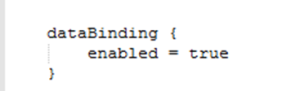
Before you begin exploring and developing with data binding library, a few steps are needed to set up your Android Studio IDE (must be 1.3 or higher and Gradle plugin 1.5 or higher). Set up your module’s gradle file:

android {
....
    dataBinding {
       enabled = true
    }
}
enable data binding

Add this dependency in your project’s gradle file:

classpath "com.android.databindig:databinder:1.0.-rc1"

And that’s it. Your Android studio is now ready for using data binding library.

If you are creating a library project using Android data binding library, the project using your library must enable data binding in modules gradle file (as explained above, data binder dependency is not required). Don’t forget to mention this in your library’s release notes.

Declaring a Data Bind Layout:

This is how we declare regular or normal layouts in Android:

<?xml version="1.0" encoding="utf-8"?>
<RelativeLayout xmlns:android="http://schemas.android.com/apk/res/android"
    xmlns:app="http://schemas.android.com/apk/res-auto">
    <TextView android:id="@+id/txt_version_name"
        android:layout_width="wrap_content"
        android:layout_height="wrap_content"......

For writing Data bind layouts, the root element of layout xml must be changed to <layout> tag. Optionally, include a data tag if a variable is to be used for populating UI elements or an import statement is required. Here is an example.

As you can see from the above example, with just a little extra code, you can easily write data bind layouts or migrate your old layouts. No reflection hacks are used for this. All the processing is done in compile time. The <layout> tag tells the XMLLayoutProcessor that this is a data bind layout. The <data> tag is used to define a variable that is to be used in populating UI; and to import custom or other classes. For example, if View.VISIBLE property is used in data bind expression (as shown below), View class (android.view.View) must be imported before using it.

Some Data Binding Expressions:

In the earlier section, I explained what is possible with data binding library. Here is how you can implement those:

  • Bind custom variables:
    • Described in previous section is custom variable (vItem)
    • Apart from that, you can bind arrays, lists, primitive types, sparse lists, maps and more
    • All declaration and imports are inside <data> tag
  • Move basic UI logic to XML layout files:
    android:text="@{vItem.name.substring(1)}" //substring in xml
    android:text='@{vItem.code + "(" + vItem.versionNum+")"}' //String manipulation
    android:visibility="@{vItem.even ? View.VISIBLE : View.INVISIBLE}"
  • Define custom attributes:

There is no such custom attribute. You can bind it with custom method definition, e.g.:

@BindingAdapter("bind:imageURL")
public static void loadImage(ImageView img, String url) {
    Picasso.with(img.getContext()).load(url).into(img);
}

Cool, isn’t it. You can imagine the possibilities with this. One awesome example is setting text font. Increases readability like 2 folds.

app:textFont="@{'awesome-font.ttf'}"

@BindingAdapter("bind:textFont")
public static void setFont(TextView tv, String fontName) {
    String fontPath = "/assets/fonts/"+fontName;
    // set font in text view here
}

Demo App:

Below is a screen shot of a sample app

Screenshot_2016-01-22-11-17-44


You can download sample application from here. (Make sure you have followed the steps properly)

Let me know what you think. Happy coding!!!

Have questions? Did I miss anything? Shoot below in comments

-Kaushal D (@drulabs twitter/github)

drulabs@gmail.com

Gearing up for android studio 2.0

Android studio


Hi,

I am gonna talk about setting up android studio 2.0 (currently only preview is available) and some of the new features in this post.

First things first… What is android studio?

If you are an android developer, the above question is useless. Here’s a little info anyway:

  • Google’s IDE for android development.
  • Built in support for Google cloud platform.
  • Flexible Gradle-based build system.
  • Built on top of latest IntelliJ IDEA platform.
  • Multi screen app development.
  • Latest version 1.5.1. (as of December-19,2015)
  • Available on android developer site. http://developer.android.com/sdk/index.html

If you are still using eclipse for android development, this is the right time to switch to android studio.

The one major problem with android studio has been speed. Android studio was slow. Since the early release of this IDE, there has been a lot of changes. Android studio 2.0 is just awesome. It is not released yet, but the preview version is available on canary channel. As of now it is recommended to keep two copies of android studio, you shouldn’t update your current dev environment to studio 2.0 preview. You can (just change the updates channel in IDE) but you shouldn’t.

Almost all the issues I faced are gone in android studio 2.0 preview 5 (released on 14-jan-2016). Awesome features (detailed later in the post).

If you are wondering how to keep multiple copies of android studio in one machine, this will help.

Now once you are done downloading the studio preview from the canary channel, import a sample project or one of your projects or simply create a new one. Few more steps to get the most out of the 2.0 preview:

  • Change the gradle plugin used in your app module to gradle:2.0.0-alpha5′
    • classpath ‘com.android.tools.build:gradle:2.0.0-alpha5’ in dependencies
    • This is required for features like instant run (read on to know more).
  • Download latest android sdk tools from preview channel.
    • This is needed for emulators 2.0 and other cool stuff (bleeding edge stuff as google calls it).

studio_2_0_tools_download_01

  • Change your update dialogue in IDE settings to get updates from canary channel and sdk tools from preview channel.
    • This is optional but set it so that you get the latest updates.
    • To set it. click help->check for updates. In the dialogue that opens click on updates hyperlink.
    • Latest android sdk tools as of now is 25.0.2 rc3.

That’s it you are now all setup for exploring and using the new android studio 2.0 preview.

Here’s almost everything you need to know about android studio 2.0 preview (preview 5 released on 14-Jan-2015):

  • If you have some time please watch this video by google devs. It explains a lotta things.
  • Broadly the new changes are categorized into three categories:
    • Build System
    • IDE enhancements
    • Android emulators

Android Studio has never been faster and developer friendly. Category wise improvements:

  • Build System
    • Improved dx merger (Build tools 23.0.2+, Gradle plugin 2.0+)
      • Pre-dexes dependencies
      • resulting in gradle build being 2.0-2.5 times faster.
      • One of my apps that has 20k+ lines of code used to take 2 min 53 sec to build, now it takes only 23 seconds. So in my case it is more than 6 times faster.
    • New experimental shrinker for debug mode
      • We all use proguard for release. It is awesome. It shrinks, optimizes and obfuscates the code. But we never get its benefit for debug mode. With the new experimental shrinker we can get the shrinking benefit right in debug mode.
      • To enable it just set minifyEnabled to true and useProguard to false in debug build type.
      • overall build deploy cycle is ~1.5 times faster. (Not great but still cool)
    • New protocol for ADB push / pull.
      • huge speed improvement in adb push n pull.
    • Instant Run (My personal favourite, requires Gradle 2.0-alpha5+ and gradlew 2.10)
      • It is process of deploying code changes on the fly without having to build the whole app.
      • You can see your changes in a matter of seconds in an emulator or a connected device.
      • Instant run is available in almost all
        • android versions (4.0+)
        • physical devices
        • emulators (2.0+ of course)
      • Hot swap (supported in 2.0 preview 2+)
        • Swap code changes on the fly
      • cold swap (supported in 2.0 preview 5+)
        • Deploy deltas for code changes that cannot be hot swapped.
        • Not tested this but according to release notes it is supported
      • Freeze swap (supported in 2.0 preview 5)
        • Build changes incrementally even if the app is not running on device or emulator.
        • Not tested this but according to release notes it is supported.
      • I think Instant run deserves it’s own blog post. Maybe later 🙂
  • IDE enhancements
    • Latest IntelliJ 15 support (15.0.2).
      • built on top of IntelliJ 15.0.2 (released sometime in NOV 2015)
    • New GPU profiler (experimental preview).
      • It is available in studio 1.5.1 as well, but with 2.0 preview you can save the entire graphic stream and play it frame by frame in emulator and device to figure out why your Open GL app crashed or ANR.
      • This is also in experimental state, but still very powerful tool for open GL.
    • In built support for Google search deep linking.
      • Deeplinks means how your app comes up in devices’ Google search when your app is installed and when not installed.
      • Deeplinks have been present for a long time now. With studio 2.0 you get one click support for creating deep links.
      • Just open manifest file and click on that yellow bulb icon on left of the editor.
    • Lot of UI improvements.
      • Download it to see the UI improvements.
  • Android emulators
    • I know, lot of us prefer real devices for testing over laggy emulators. But I believe with emulators 2.0 you would prefer emulators over actual device.
    • Completely new UI with extended controls.
      • Control almost every feature of emulated device
    • Drag and drop apks and files to install and copy.
    • Send sms, receive calls.
    • System keyboard support.
      • Directly type in from system keyboard.
    • Finger printing support.
      • If you don’t have Nexus 5X or 6P, you can test finger printing API using emulators 2.0. It features a set of 10 fake finger prints to test the API.
    • Resize emulators.
    • Emulate GPS locations via kml and gpx files
    • android emulator 2_0


The mentioned points cover some of the new features introduced in android studio 2.0 preview. One important part that I left out here is the testing support. There is a new way to test various product flavours. I still don’t know much about it, I think it is called hermetic testing. You can test instrumentation and android test simultaneously.

I will cover more on emulators and how Instant Run works in upcoming blog posts.

Stay tuned.

Have questions? Did I miss anything? Shoot below in comments

-Kaushal D (@drulabs twitter/github)

drulabs@gmail.com